PloView11.0
Publisher Description
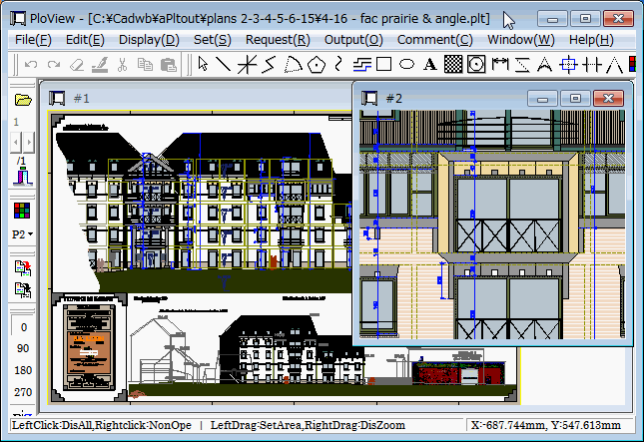
PloView is viewer for viewing drawing of HPGL/Vector/image file.
And, it has about the same powerful input and edit function as 2D-CAD.
(1) File: Support to many file formats
Input: HPGL,HP-GL/2,HP RTL,PDF,DXF,DWG,GERBER,NC-Drill,IGES,SXF,EMF,
TIFF,JPEG,Bitmap,PCX,FPX,GIF,PNG,CMT
Output:HPGL,HP-GL/2,HP RTL,PDF,DXF,DWG,IGES,SXF,EMF,TIFF,JPEG,Bitmap,
PCX,FPX,GIF,PNG,Printer,Plotter,WMF,PS,EPS,SVG,XPS,PCL,CMT
Black / white and color copy to clipboard.
(2) Display
- Color and width change of line, 'black and white' / 'color' change,
background color change, pen ON/OFF
- Display mode (Copy/Merge/Xor/data) change
- Rotation, mirror, grid displaying
- Thumbnail display
- Multi-page correspondence
- Vector font / TrueType font change of text font
(3) Request
- Measurement function of coordinates, length, area, line width, and angle
- Search text
- Connected line search, the total line length measurement
(4) Edit drawing (Comment function)
* File:
- New create
- Input file of (1)
- Save to file of (1)
* Insert:
Figure kind:
Polyline, Arc, Circle, Horizontal line, Vertical line, Slanting line,
Opposite side angle line, Regular polygon, Ellipse, Offset line,
Free curve, Cloud shape line, Spline, Surface, Rectangle, Long circle,
Text, Bitmap, Macro,
Dimension (Horizontal, Vertical, Parallel, Angle, Radius, Diameter)
Insert Coodinates at Key, Insert Same Point, Next Same Point,
Insert-Grid ON/OFF
* Set:
Layer: 1..20, Set property
* Edit:
Select (individual, rectangular area, polygon area selecting),
Move copy, Delete, Divide/Delete/Move/RouteChange polyline section,
Delete line in selected area boundary, Trim, Change property,
Change vertex R, Chamfer, Connect Line, Rotate copy, Scale Up/Down copy,
Macro-izing, Macro breakup, ReDo, UnDo
About PloView
This Viewers program is available in English. It was last updated on 29 September, 2026. PloView is compatible with the following operating systems: Other, Windows.
The company that develops PloView is Isoplotec Corporation. The latest version released by its developer is 11.0. This version was rated by 1 users of our site and has an average rating of 4.0.
The download we have available for PloView has a file size of 30.4 MB. Just click the green Download button above to start the downloading process. The program is listed on our website since 2022-07-27 and was downloaded 189 times. We have already checked if the download link is safe, however for your own protection we recommend that you scan the downloaded software with your antivirus. Your antivirus may detect the PloView as malware if the download link is broken.
How to install PloView on your Windows device:
- Click on the Download button on our website. This will start the download from the website of the developer.
- Once the PloView is downloaded click on it to start the setup process (assuming you are on a desktop computer).
- When the installation is finished you should be able to see and run the program.
Program Details
System requirements
Download information
Pricing
Version History
version 11.0
posted on 2022-07-27
(1) Compatible with Windows 11. (2) Code signing was added.
version 10.0
posted on 2015-11-20
Comment function was greatly improved just like 2D-CAD. It corresponded to input and output of DWG and SXF file.
version 10.0
posted on 2015-08-12
Comment function was greatly improved just like 2D-CAD. It corresponded to input and output of DWG file.
